
SM Space · Purchasing & Procurement
Procurement Software for Purchasing and Purchase Orders
SM Space Procurement is the procurement software inside the SM Space ERP system. It carries a purchase from the moment somebody asks for something to the moment the supplier is paid — requests, quotes, approvals, orders, deliveries and bill matching. Every step writes itself into your accounts, so nobody types an order in twice.
Know what you already have, what you last paid, and what is already on its way — before you place the order.
Last updated: September 2026
A request becomes a paid order
- RequestPUR-000112
- Approveddept head, then finance
- PO-000312$18,400
- Received 38 of 40held, not paid
- Short delivery agreedbill cut to 38
- Invoice matchedorder · delivery · bill
- Postedinto the ledger
We already have some
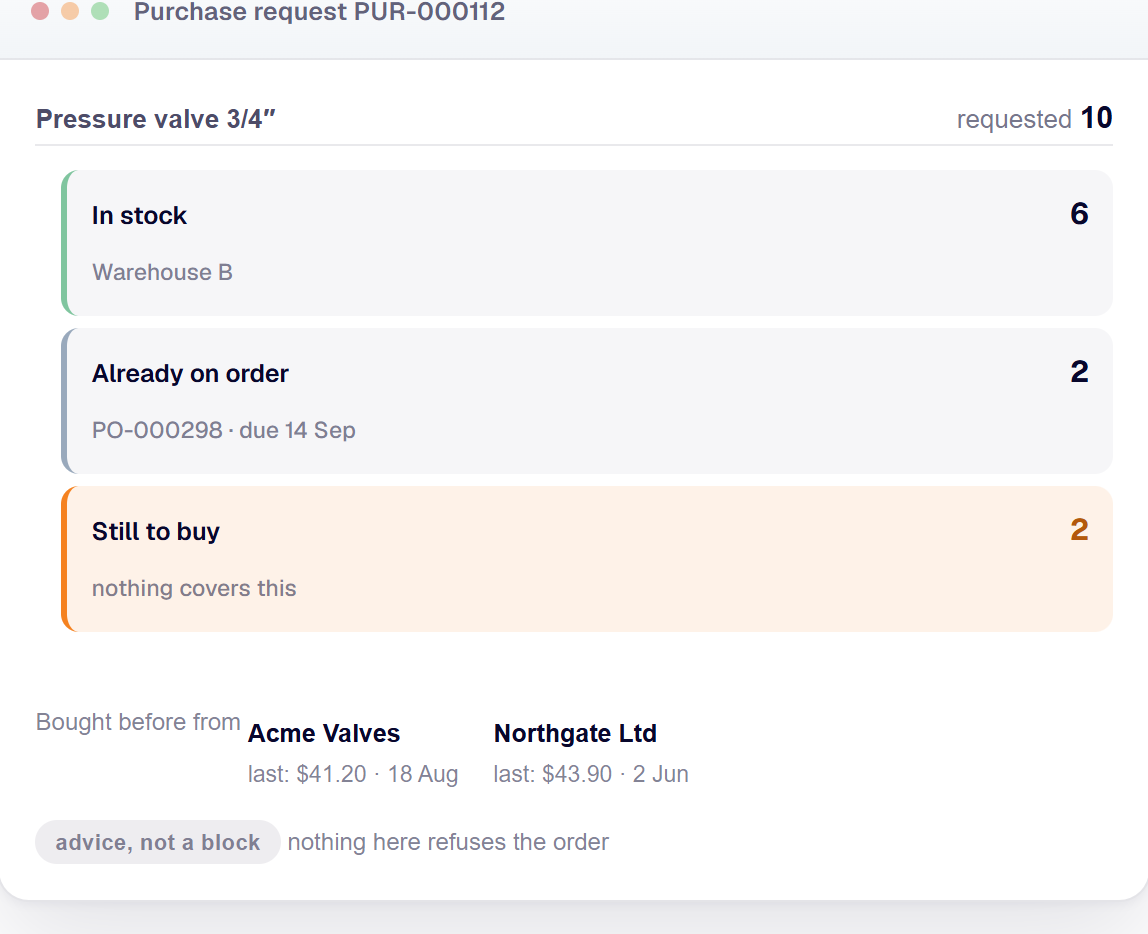
Pressure valve 3/4″ · requested 10
- In stock6Warehouse B
- Already on order2PO-000298, due 14 Sep
- Still to buy2nothing covers this
advice, not a block
Where the price came from
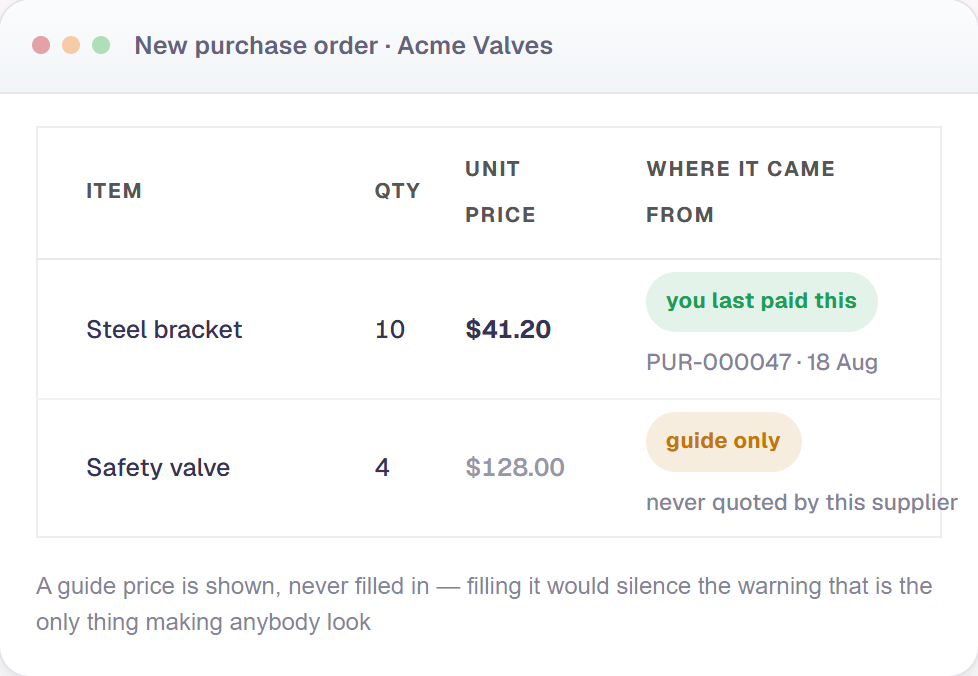
- Steel bracket$41.20you last paid this · PUR-000047 · 18 Aug
- Safety valve$128.00guide only — never quoted by this supplier
the second one is a guide, and says so
One line, one order
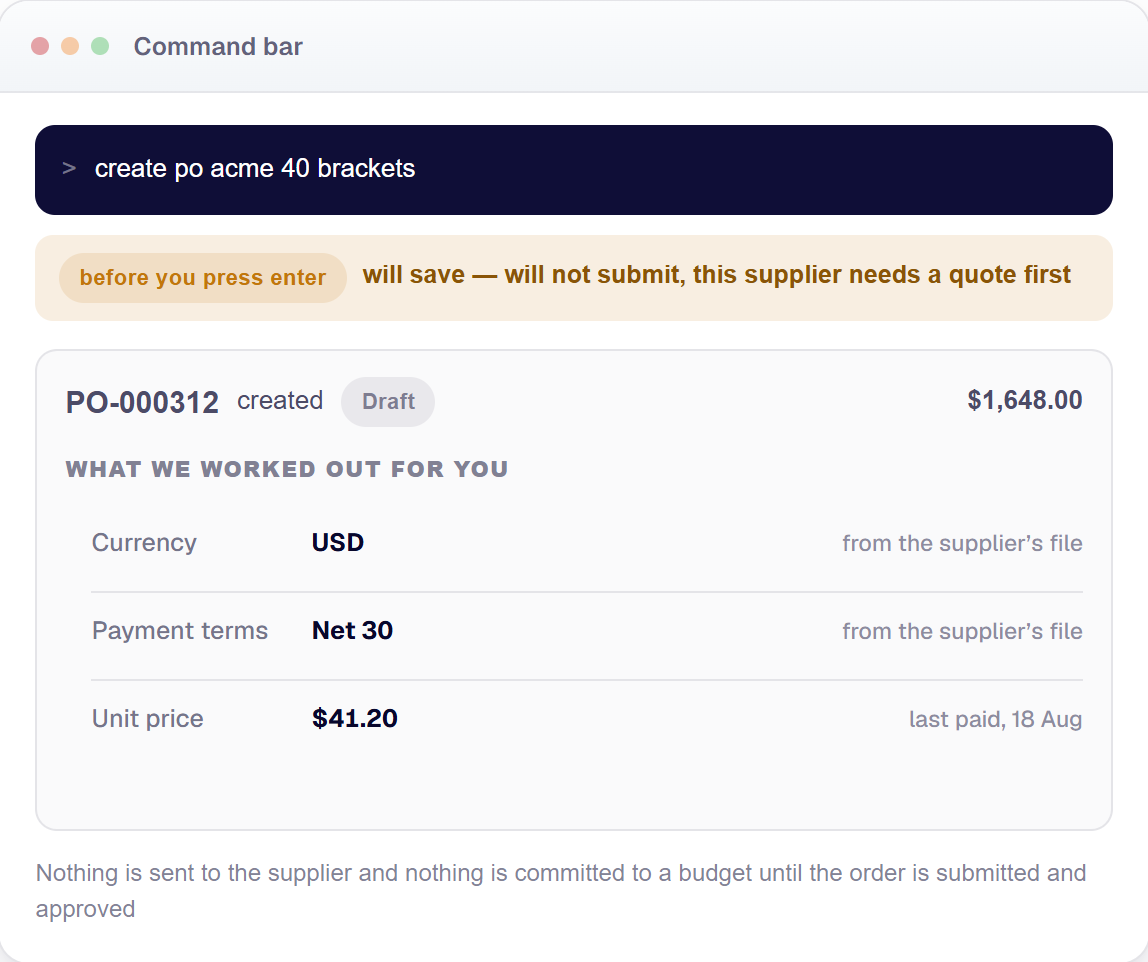
>create po acme 40 brackets
will save — will not submit, this supplier needs a quote first
- CurrencyUSDfrom supplier file
- Payment termsNet 30from supplier file
- Price$41.20last paid, Aug
what we had to work out, handed back
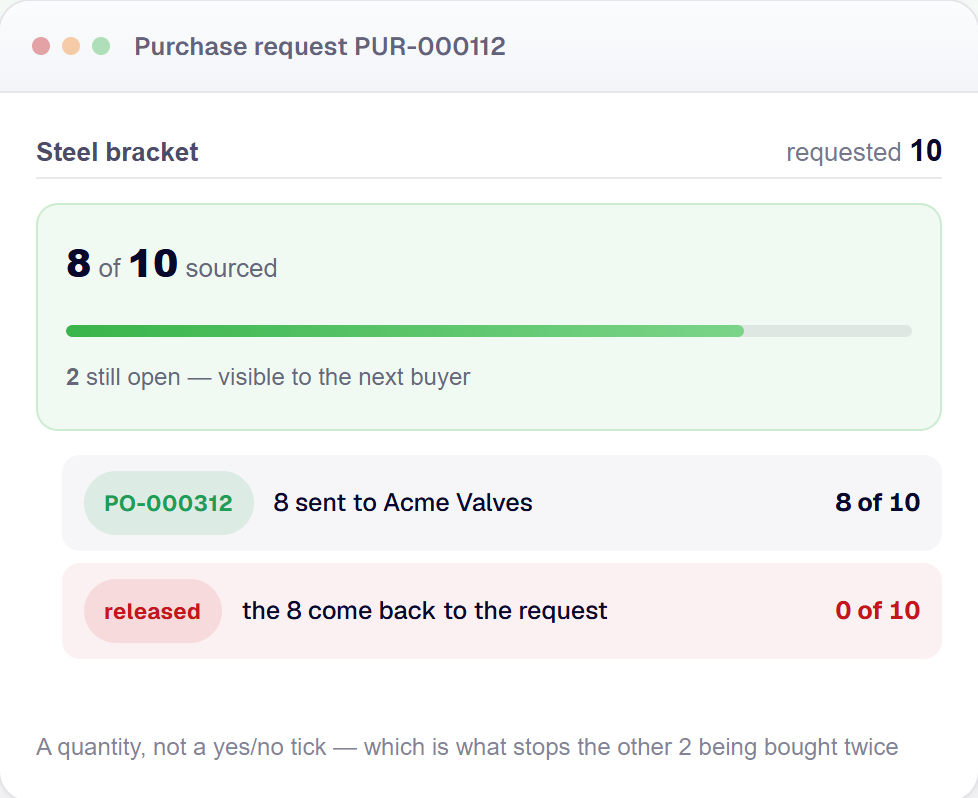
8 of 10 sourced
Steel bracket · requested 10
8 of 10 sourced
- PO-0003128request line: 8 of 10 sourced
- released8request line: 0 of 10 sourced
cancel it and the quantity comes back
Above: a request becoming a matched, paid order; stock and open orders checked before buying; prices shown with where they came from; a full order raised from one line; and a request line tracking how much of it has actually been bought.
What you can do
- Raise a request and see straight away whether it is already in stock or already on order
- Send one enquiry to several suppliers and compare what comes back side by side
- Get a recommendation on which quote to take, with the reason it was picked
- Turn an approved request into an order, or split one request across two suppliers
- Route an order for approval by value, so a $12,000 order goes to the department head then finance
- Receive goods, inspect them, and reject a bad batch without touching the order
- Spread freight and duty across the lines they belong to, so the item cost is the real cost
- Check the order, the delivery and the bill agree before anyone pays — inside a tolerance you set
- Raise a return or a credit note against the order it came from
- Keep every document, approval and change against the record that caused it
01
Check Stock Before You Buy
Before a request turns into an order, the screen answers three questions that used to mean leaving the page: do we already have it, is it already on order, and who has sold it to us before.
Ask for 10 pressure valves and the panel says 6 are sitting in Warehouse B, 2 are already coming on PO-000298 due 14 September, and 2 are genuinely still to buy. The stock figure is Inventory’s own number — SM Space reads it rather than working out a second opinion that disagrees by Thursday.
It is advice, not a block. Buying something that is on a shelf 400 miles away is often the right call, so nothing here refuses anything. A line for a service, or for something typed in by hand, shows a blank rather than a zero — “we have none” and “this was never stocked” are different answers.
02
Purchase Order Prices That Explain Themselves
Most systems either fill the price box or leave it empty. SM Space fills it and then tells you where the number came from.
A steel bracket comes in at $41.20 with “you last paid this — PUR-000047, 18 Aug”. A safety valve comes in at $128.00 marked “guide only — this supplier has never quoted it”, and it is printed greyer, because that figure is the item’s own standard cost rather than anything this supplier ever agreed to.
The difference is the whole point. A buyer’s real question is not what number the system found, it is whether the supplier is on the hook for it. The guide price is shown and never written on to the order — filling it in would silence the “no price known” warning, which is the only thing making anybody look.
03
Raise a Purchase Order in One Line
Type create po acme 40 brackets into the command bar, answer what it asks, and you get a finished order — header, lines, number and all. Not an empty order and a link to go and fill it in.
It hands back what it had to work out for itself: the currency and the payment terms came from the supplier’s file, and a line nothing could price is created at zero and named, rather than the whole order being refused over it.
It also warns you before you finish typing. “Will save — will not submit, this supplier needs a quote first” is a warning, not a refusal, because the ordinary create screen allows exactly the same thing. Send the same command twice and you get the first order back, not a second one.
04
Partial Sourcing and Purchase Request Tracking
A request line remembers how much of itself has already been bought. Not a yes/no “converted” tick — a quantity.
Somebody asks for 10. You send 8 to one supplier because that is all they have, and the line reads 8 of 10 sourced. The other 2 stay visibly open, so the second buyer does not quietly order 10 more on Friday. Release or cancel that order and the 8 come straight back: the line reads 0 of 10 again.
One request can also be split across two suppliers in a single step, or several requests combined into one order to the same supplier. The counting holds either way, and that is what stops the same request being bought twice.
How it fits with the rest of SM Space
Buying stops being a job that ends in an email to Accounts. An approved supplier bill is already in the ledger — the receipt, the bill and the payment post as they happen.
- Request Stock checked, budget checked
- Quote One enquiry, several suppliers
- Purchase order Committed, not yet spent
- Delivery Stock goes up, at landed cost
- Supplier bill Matched three ways, then posted
Every step writes itself into the same general ledger, tagged to the department or project that asked for it.
Stock figures come from inventory management and are never recalculated here. Deliveries and returns move the same stock sales and invoicing sells out of. Reporting and dashboards reads the same rows, and audit and compliance keeps who approved what. A spend can also be checked against its budget before it becomes an order — that check lives on the accounting and finance page. Ten purchasing documents can be put on the shared approval workflow software, which is where who has to sign it is decided, along with deadlines, deputies and what happens when nobody answers. The enquiry itself leaves through the shared alerts and notifications software, which queues it, attaches the RFQ as a PDF, retries a supplier whose mail server is down, and checks anyone who has asked not to be contacted before it sends.
- Approval routing by value A $12,000 order goes to the department head, then finance. A $300 one goes straight through.
- Three-way matching Order, delivery and bill checked against each other, inside a tolerance you set.
- Multi-currency Buy in the supplier’s currency, report in yours.
- Multi-company Separate books per legal entity, one set of suppliers.
- Cloud Runs in a web browser, nothing to install.
- Audit trail Every approval, change and document stays with the record that caused it.
Who this procurement software is for
Small and mid-sized businesses placing enough orders that nobody can remember what they paid last time, and where two people have ordered the same thing in the same week. You have more than one warehouse, or more than one currency, or an approval that currently happens by email and gets lost. SM Space is a cloud ERP system — it runs in a web browser, with nothing to install.
Frequently asked questions
- What does SM Space Procurement do?
- It runs buying from end to end: a request, an enquiry to several suppliers, approval, a purchase order, the delivery, and matching the supplier's bill against both before anyone pays it. It is part of the SM Space ERP system, so an approved bill is already in the general ledger. There is no export step.
- Can I stop people ordering something we already have in stock?
- You can show them, and SM Space does it without being asked. Every purchase request line shows what is on hand, in which warehouse, and what is already on order. The stock figure is Inventory's own. It is advice rather than a block, because ordering something held at another site is often the right call.
- How do purchase order approvals work?
- By value, by supplier, by item category, or by all three. You write an approval policy with steps, so a $12,000 order goes to the department head and then to finance while a $300 one goes straight through. Each step can have its own value band, an approver can send an order back instead of rejecting it, and approving your own order can be forbidden.
- Does it do three-way matching?
- Yes, and two-way and four-way. Before a supplier invoice is paid, SM Space checks that the order, the delivery and the bill agree on quantity and price, inside tolerances you set as a percentage or as an amount. A delivery of 38 against an order of 40 is held and named rather than quietly paid.
- Can one request be split across two suppliers?
- Yes. Split a request by supplier and each supplier gets its own purchase order, while each request line keeps count of how much has been bought so far: 8 of 10, not just "converted". It works the other way too, so several small requests can be combined into one order to the same supplier.
- Does it work with our accounting, or is that separate?
- It is the same system. SM Space Procurement and SM Space Accounting share one database and one general ledger, so the receipt, the supplier invoice and the payment post as they happen, in the currency they were made in. Nothing is exported, imported or typed in twice.
Raise your first order in it.
Book a 30-minute demo and we’ll set up your suppliers, your approval limits and one real request.
Book a 30-minute demo